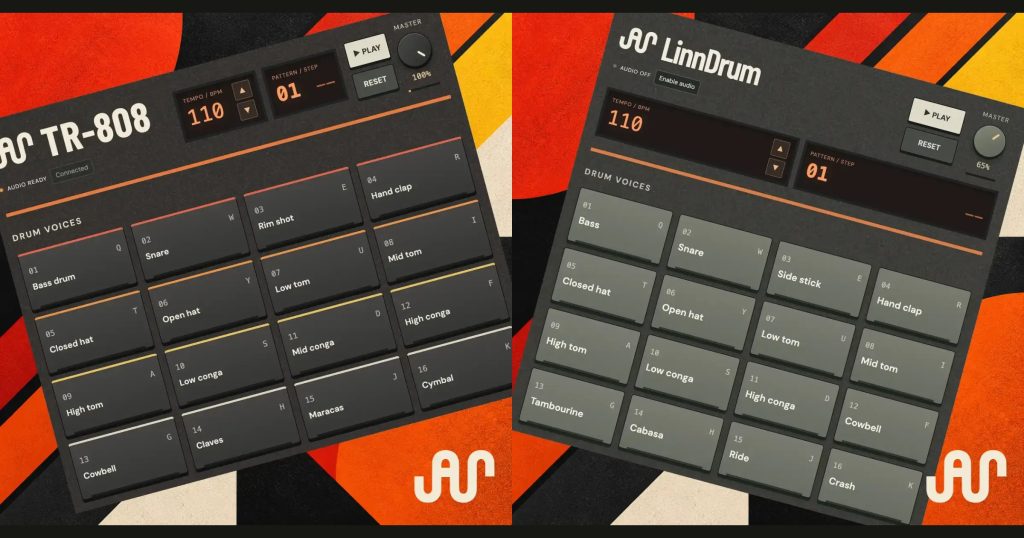
Two classic drum machines. Five effects. Completely free. We’re bringing Voclr.it and audionode.io together to give you another place to start your next track: a pair of playable drum machines that run right in your browser.
The TR-808 and LinnDrum emulators are live now on audionode.io. Tap out a rhythm, program a pattern, shape individual sounds and add effects. When you have something you like, download it as a WAV and bring it into your own session.
Both drum machines and all five current FX are free to use. And this is only the beginning: we’re developing more emulations, actively expanding the FX rack across our instruments, and building a huge, free, open sample library at AudioNode.


TR-808: build your beat from synthesized drums
The AudioNode TR-808 brings sixteen synthesized drum voices to the browser, from bass drum, snare and hand clap to hats, toms, congas and percussion. The sounds are generated by the engine rather than played back from recorded drum samples.
Start with the kick, add a snare and experiment with the hats. Voice-specific controls let you shape tone, decay and other parts of the sound: stretch a kick, sharpen a snare or give an open hat more room. The accent row adds extra emphasis where the pattern needs it.
Play with a mouse, touch the pads or use your computer keyboard. It’s an easy way to sketch a rhythm around a vocal, build a percussion layer or find a drum sound worth taking into a bigger project.
LinnDrum: explore ROM-based drums and a stereo mixer
The LinnDrum takes a different approach, using ROM-based drum playback across sixteen playable articulations. Bass, snare, side stick, clap, hats, toms, congas and percussion sit alongside ride and crash cymbals.
Its mixer gives you stereo pan and level control, with tuning available for selected voices. You can also explore alternative ROM sounds and combine compatible choices into your own kit without starting the pattern again.
Switch between the TR-808 and LinnDrum tabs to explore both approaches. A rhythm that feels right with one set of drums can lead somewhere different when you start shaping another.


Build a pattern, then make it your own


Both instruments give you a step sequencer with independent drum lanes. Place hits, mute parts to hear what they contribute, or solo a few sounds while you work on the groove.
Each row’s SPLIT control lets you move from sixteen to thirty-two, forty-eight or sixty-four editable steps within the bar. Use a faster subdivision for a hat or percussion part while keeping the kick and snare simple.
If you want a starting point, choose a genre and generate a groove. Hip hop, synth pop, synthwave, house, electro, disco, funk and new wave provide different directions to explore. Keep the parts you like and change the rest.


Five FX today, with more in development
The effects are part of the instruments. Add them to individual drum lanes or work on the complete mix in the master rack. Shape a snare on its own, give percussion some movement or bring the whole beat together.
We’re actively expanding the FX rack across all our instruments. These are the five units you can use today, with more effects in development.
Quake — saturation for warmth, grit and weight

Quake adds harmonic character and edge. Drive controls how hard you push it, Tone changes the colour, Mix blends the processed and original signals, and Output lets you balance the level. Try a little on a snare or percussion lane, then compare it with the effect bypassed.
Bastion — levels and peak limiting

Bastion helps manage the final peaks of your drum mix. Set the input and output level, choose a ceiling and adjust the release to suit the material. Its stereo meters and limiting display make it easier to see what changes as you add sounds or push the other effects.
Mirage — reverb with 24 presets and tail-shaping filters

Mirage gives your drums a sense of space, from short rooms and plate-style settings to halls and longer ambient tails. Its twenty-four presets offer starting points, while Space, Time, Shade and Drift let you reshape the result.
The HPF and LPF controls filter the wet reverb, helping you reduce low-end buildup or soften the top. Bloom ducks the reverb around a hit so the dry attack can lead before the tail returns. Try a short room on percussion or a plate-style preset on a snare.
Spool — tape character and movement

Spool brings together saturation, tonal colour and wow/flutter. Drive adds weight, Wear changes the character, and Wow introduces movement. The 7.5 and 15 IPS settings offer two tape-inspired flavours. Start gently, then use Mix to decide how much of the effect belongs in your beat.
Clasp — compression for punch and cohesion

Clasp shapes drum dynamics with adjustable threshold, ratio, attack and release. Makeup restores level after compression, while Mix makes parallel compression easy to explore. Its Drum Glue, Punch and Parallel Crush presets give you three different starting points for a single lane or the master mix.
Take your sounds into your next track
When the beat is ready, export a four-bar loop or a single drum hit as a 48 kHz, 16-bit stereo WAV. You can include the effects or export without them, depending on how much processing you want to do later.
Save the pattern as a local project file if you want to return to the editable beat and its settings. That makes the emulators useful for quick ideas as well as sounds you want to keep developing.
This is just the beginning for AudioNode
The TR-808, LinnDrum and current FX collection are the first part of a much bigger project. We’re emulating more instruments and building a huge, free, open sample library at audionode.io, with more sounds and tools to explore as it grows.
We want producers to have more ways to get an idea moving: a vocal to build around, a drum machine to find the groove, an effect that changes the mood, or a sample that takes a track somewhere new.
For now, open a machine, press Play or tap a pad, and start making something. It’s completely free.